
Employee Management Software for Small Businesses
Employee management software consolidates all these operations under one dashboard and enables businesses to manage their employees efficiently.
- admin
- 21 September 2026
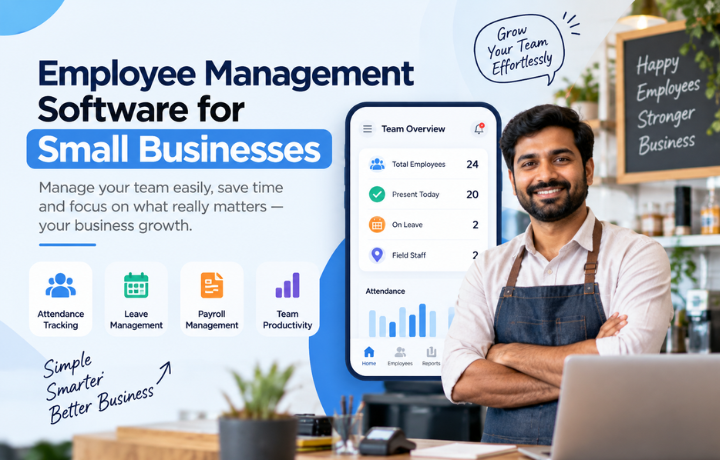
Employee management isn’t just about maintaining an employee name, email ID, and contact list. The businesses have to deal with employee attendance, working hours, leaves, assignments, employee information, and staffing. For smaller companies, all these become quite overwhelming in a situation where everything has to be handled via spreadsheets, email, and different systems. Employee management software consolidates all these operations under one dashboard and enables businesses to manage their employees efficiently.
Good employee management software can decrease the amount of administrative work required for it and provides good insight into the daily operations of employees.
What Is Employee Management Software?
Employee management software refers to computer-based systems that facilitate effective organization and management of employee activities from one single interface.
This eliminates the need for maintaining separate logs for attendance, leaves, employee data, and working hours of employees.
Common functions include:
- Employee record management
- Attendance tracking
- Working-hour tracking
- Leave management
- Task management
- Employee performance tracking
- Payroll-related information
- Workforce reports
- Mobile employee access
The exact features vary by platform, so businesses should select software according to their workforce requirements.
Why Do Small Businesses Need Employee Management Software?
Small enterprises usually lack sufficient HR capacity. For instance, one individual can undertake the recruitment process, attendance, coordinating payroll, keeping records of employees, and other functions.
Use of manual processes can increase the burden.
Having an integrated system is likely to assist companies in organizing information and eliminating unnecessary administrative tasks. It can also help in making the information on employees more accessible and updated.
Employee management effectively helps in increasing efficiency and involvement and keeping good records, among others. It is also noted by the source that small companies can automate certain processes like leave management, performance management, documentation, etc.
What Happens When Employee Management Is Done Manually?
Using separate spreadsheets and communication channels can create gaps in employee management.
Manual Approach | Employee Management Software |
Employee data stored in different files | Employee information stored centrally |
Attendance updated manually | Digital attendance tracking |
Leave requests handled through email or messages | Structured leave requests and approvals |
Working hours calculated manually | Digital time records |
Reports take more time to prepare | Faster access to workforce reports |
Employee information can become scattered | Centralized employee profiles |
Remote employees can be harder to manage | Digital tools for distributed teams |
Repetitive HR work takes more time | Automation can reduce administrative work |
The source identifies scattered employee data, manual errors, communication gaps, and administrative overload as common issues with disconnected HR processes.
How Employee Time Management Software Works
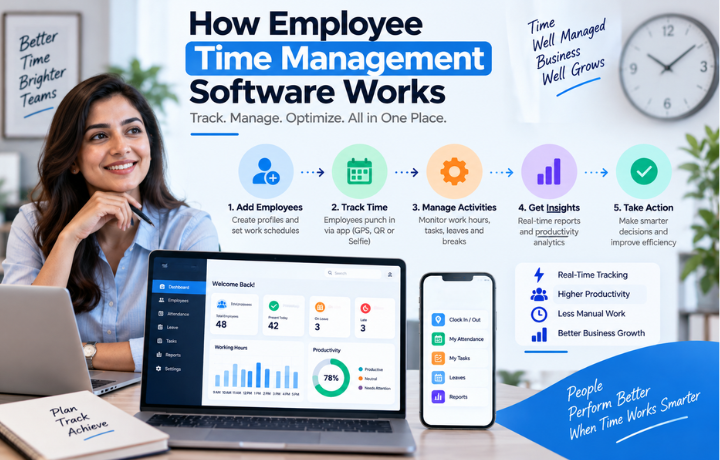
Working hours are an important part of workforce management.
Employee time management software helps businesses record and organize information related to employee working hours.
Depending on the system, employees may be able to check in and check out through mobile or web-based tools. Managers can then review attendance and working-hour information.
Useful time-management features may include:
- Check-in and check-out
- Working-hour records
- Attendance history
- Late arrival tracking
- Absence records
- Leave information
- Shift management
- Time reports
When time records are organized digitally, businesses can reduce the need for manual calculations and repeated follow-ups.
Employee Management Tracking System for Modern Workplaces
An employee tracking system could assist businesses in having visibility on attendance, working hours, job completion, and many other activities of their employees.
This would be especially useful in cases where employees work from different locations.
For remote or field-based employees, businesses may require certain digital solutions that enable them to coordinate attendance and job-related activities without the physical presence of their employees in the office.
But, at the same time, employee tracking should be transparent for employees.
Can Free Employee Monitoring Software Help?
Free employee monitoring software may appear attractive to startups and small businesses that want to reduce initial software costs.
However, free does not always mean suitable.
Before choosing a free solution, check:
- Number of employees supported
- Available features
- Data storage
- Reporting options
- Attendance functionality
- Time tracking
- Security controls
- Mobile access
- Customer support
- Upgrade options
A basic free tool may be sufficient for a small team with simple requirements. Growing businesses may eventually need more comprehensive workforce management capabilities.
Free Staff Management Software: What Should You Expect?
Free staff management software can help businesses start moving away from paper-based or spreadsheet-based processes.
However, businesses should identify their priorities before selecting a free plan.
If your main requirement is basic attendance, a simple solution may be enough. If you need employee records, time management, leave, payroll integration, reports, and remote workforce support, you may need a broader HR platform.
Important Features to Look For
A useful employee management platform should provide more than basic employee records.
Look for:
Centralized Employee Records
Employee information, documents, and work details should be easy to access and manage.
Attendance and Time Tracking
The system should make it easier to record attendance and working hours.
Leave Management
Employees should be able to submit leave requests while managers can review and approve them through a structured process.
Task Management
Managers should be able to assign and track employee tasks when this feature is required.
Mobile Access
Mobile access is particularly useful for remote, field, and hybrid employees.
Payroll Integration
Connecting attendance and leave information with payroll can reduce repeated data entry.
Reports
Workforce reports can help managers understand attendance, time, and employee activity.
How to Choose the Right Employee Management Software
There is no single system that works for every business.
Start by understanding your workforce.
Ask:
- How many employees will use the platform?
- Do you have remote or field employees?
- Do you need attendance and time tracking?
- Should leave connect with attendance?
- Do you need payroll integration?
- Do managers need task management?
- Do employees need mobile access?
- Will the software support future growth?
Scalability is important because replacing your system every time the workforce expands can create unnecessary costs and disruption.
Manage Your Workforce Smarter With UNIRR
UNIRR Feature | How It Helps as Employee Management Software |
Employee Management | Keeps employee information organized in one centralized system for easier HR administration. |
Smart Attendance | Helps employees record attendance through digital methods such as selfie, QR, and manual attendance. |
Employee Time Tracking | Helps businesses maintain working-hour and attendance records in a structured way. |
Leave Management | Makes it easier for employees to submit leave requests and for managers to review and manage them. |
Task Management | Allows managers to create, assign, prioritize, and monitor employee tasks. |
Payroll Management | Helps organize payroll-related employee information and connect it with attendance and leave data. |
Remote Employee Management | Supports businesses in managing office, remote, and field employees through digital HR tools. |
Employee Records | Provides a centralized place to manage important employee information and records. |
Workforce Visibility | Helps managers stay informed about attendance, tasks, employee activities, and workforce operations. |
Reports & Insights | Helps HR teams and managers access organized workforce information for better planning. |
Mobile Access | Makes relevant HR and employee management functions accessible through mobile devices. |
Centralized HR Management | Brings attendance, employee management, leave, payroll, and tasks together in one platform. |
Conclusion
Employee management allows organizations to develop effective processes and provides employees with more clarity in terms of attendance, leave, working hours, work assignments, and responsibilities at the workplace.
Employee management software can bring together these processes, thus eliminating the need to depend on separate spreadsheets and manual processes.
In a similar way, staff management software can assist businesses to organize the activities of their employees, while employee time management software will help track working hours and attendance.
Organizations looking for an employee tracking system, free employee monitoring software, or free staff management software need to consider several aspects and make the most out of what they have.